


Taximeter. GPS taxi cab meter.
4.11.00 Reviews
App Specs
- Version
- 1.3
- Updated On
- License
- Free
- Downloads
- 10,000+
- Developer
- Kalimex-consulting s.r.o. & Stanislav Dvoychenko
- Categories
- Auto & Vehicles
- Platform
- Android
Screenshots
 Analysis by AppCompare
Hey there! So, I recently took the plunge and installed Taximeter, the GPS taxi cab meter app that's been getting quite a bit of buzz lately. If you're a cab driver or someone who frequently uses taxis, you're probably curious about whether this app is worth your time. Well, buckle up, because I'm here to give you the lowdown after giving it a test drive.
Checking the fare before the shift begins
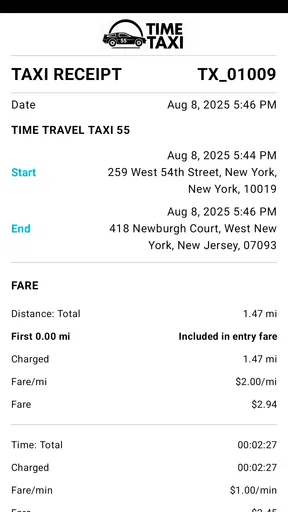
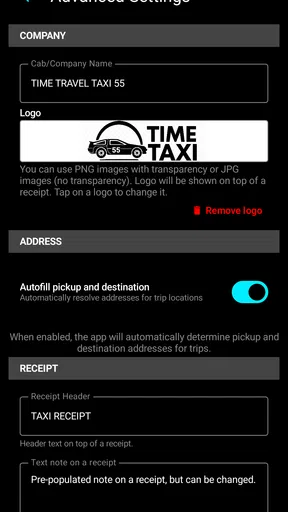
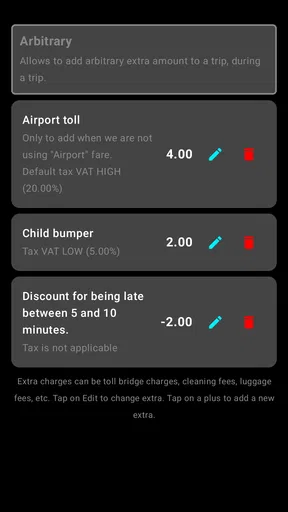
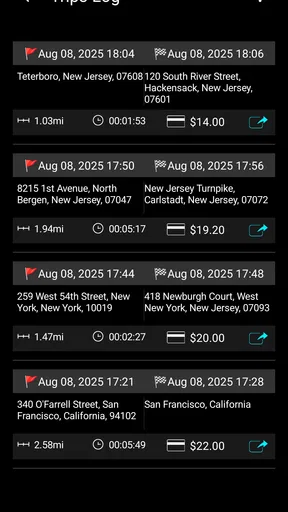
I see the strongest case for this app in a particular kind of work: a driver who needs to calculate fares consistently and keep a record of trips, rather than someone looking for a complete dispatch system. The app is free to install, and its stated functions include unlimited fares, a trip log, receipts, trip extras and tax. That combination matters because the amount a passenger owes is not always just distance multiplied by a rate. Waiting, additional charges and tax can all affect the final figure, and keeping those pieces together can make a trip easier to explain later.
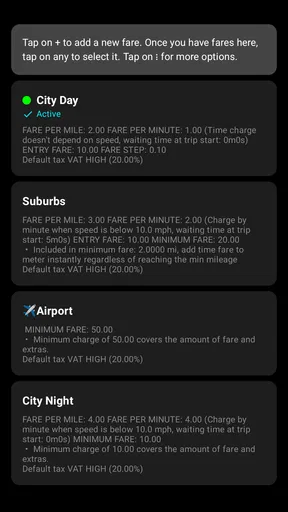
A useful routine is to check the fare setup before accepting passengers, not while moving. If you work across areas with different rules, reviewing the relevant fare before each shift can reduce the chance of carrying over a setting from the previous day. I would also treat the first few trips as a check: compare the displayed total with the fare rules you are expected to use, and confirm how extras and tax are represented before relying on receipts for customer-facing records.
For example, imagine finishing a late airport run and then taking a short local trip with a different charge structure. A trip log gives you a place to review the rides separately, while a receipt can help make the amount legible to the passenger. That is a more useful workflow than trying to remember the details at the end of a busy shift. It is also a reason to keep the phone positioned safely before starting: the app can support the calculation, but it should not become a reason to handle a screen while driving.
Getting Started with Taximeter
First things first, setting up the Taximeter app is a breeze. It's available for both Android and iOS, so no worries about compatibility. Once you've downloaded and installed the app, you're greeted with a clean and intuitive interface. Trust me, you don't need to be a tech wizard to get this baby running. The setup walks you through everything step-by-step, and within minutes, you're all set to start tracking rides.
Features That Make a Difference
Now, onto the features. This app is packed with tools that make it stand out. The real gem here is the precise GPS tracking. Whether you're in a busy city or taking a scenic route, the app keeps your location spot-on, ensuring accurate fare calculations. Gone are the days of manual entries and potential errors. The app automatically calculates the distance traveled and the fare, saving you a ton of hassle.
Another cool feature is the ability to customize rates. If you're working in an area with variable pricing or surge rates, you can tweak the settings to match local conditions. This flexibility is a game changer, especially if you're a driver who operates in different zones. Plus, you can set multiple tariffs and even include waiting time charges, which is super handy.
Worth Reading Before You Choose

Baby Panda World Brings Quick Play to Modern Phones, but Its Game Library Feels Busy

ESPN’s Live Game View Makes Following Close Games Easier

QuizzLand Review: A Good Fit for Short Trivia Breaks, Not Every Player

Basketball Stars: Multiplayer Is Fast, but Can It Recover When Matches Go Wrong?

WEBTOON Turns Phone Updates Into a Better Reading Routine

Link to Windows Runs on Shared Habits, Not Social Feeds
User Experience and Interface
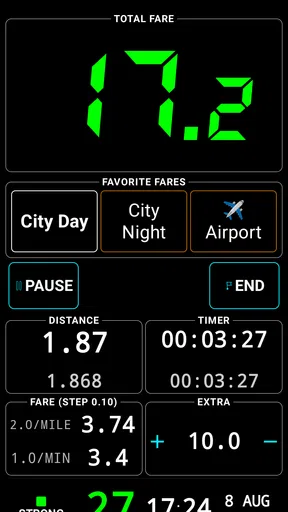
The app's interface is sleek and user-friendly. Everything is laid out in a way that just makes sense. The main screen shows your current trip status, including distance, time, and fare. All the essential info is right at your fingertips, which is exactly what you need when you're on the road.
One thing I really appreciate is the color-coded system. It helps you easily distinguish between different states, like when you're available for a new ride or currently in transit. This visual aid is subtle but effective, enhancing the overall user experience.
Readable at a glance, with practical limits
For a driver, readability is not just a matter of taste: it affects how quickly you can check a fare while parked, confirm a trip has started, or show a passenger what is being charged. I find the appeal of a focused meter screen is that it can keep the key trip information together, instead of making you move between a map, calculator and notes app. Still, a clean layout is not the same as a guarantee that every person will find it easy to use. Screen size, glare, eyesight and familiarity with touch controls all make a difference.
If small text or low contrast is a concern, I would set up the phone display to suit your needs before a shift and test the app while stationary. Make sure fare details can be read without leaning toward the screen, and avoid relying on color alone to interpret status. Color cues can be helpful, but a driver who has difficulty distinguishing colors should verify that the state is also clear from the text or other visible cues. That simple check is more useful than assuming an interface will work equally well for everyone.
There is also a trade-off between seeing more information and keeping the display uncluttered. On a compact phone, a meter that prioritizes the current fare may be easier to scan than a screen crowded with every trip detail. The trip log and receipts are better suited to a stop between rides or the end of a shift, when you can review them carefully. I would not use a moving vehicle as the place to explore settings, edit a tariff or inspect a past trip.
Motor and sensory considerations on the road
Touchscreen controls can be awkward for someone with limited dexterity, hand tremors or difficulty reaching a mounted phone. Before relying on the app, I would rehearse the basic start-and-finish routine while parked, then leave the phone secured in a position that does not block the road view. If you need frequent precise taps to keep a fare correct, that may be a sign this setup is not comfortable or safe for your driving situation.
GPS-based tracking also depends on the phone being able to establish its position. In places with tall buildings, tunnels or other signal obstructions, a route may not be captured as smoothly as it is on an open road. I would treat the meter as a practical aid, not as permission to stop paying attention to the route or the agreed fare. If a passenger questions a total after a difficult stretch, a calm explanation and a review of the trip record are better than trying to troubleshoot the phone while traffic is moving.
Sensory needs vary, too. Some drivers prefer visual confirmation; others may find frequent screen checking tiring or distracting. I would not assume that a GPS meter provides spoken prompts or vibration cues unless those options are clearly available and tested on your device. Drivers who need audio-first guidance may be better served by a tool explicitly designed around that interaction, while keeping the meter for fare records if using both is allowed in their work setup.
Situations where the workflow fits—and where it does not
This kind of app makes the most sense for an independent taxi driver, a small operator who wants a phone-based meter, or a driver who needs organized trip records without adopting a larger dispatch platform. It may also suit someone who occasionally provides paid rides and wants a more consistent way to calculate charges than mental arithmetic. The trip log and receipts are particularly useful when you want to separate one ride from another instead of relying on memory at the end of the day.
It is less suitable if your work depends on dispatch, passenger booking, fleet oversight or other business tools beyond metering. A dedicated taxi platform may be a better fit when several drivers need shared operations or a company requires a particular approved meter. Likewise, if your local rules require certified equipment or a specific fare display, check those requirements before treating a phone app as a replacement. A convenient calculation tool does not automatically satisfy every licensing or regulatory obligation.
Compared with a basic calculator, a meter can tie the fare to a trip rather than leaving you to enter and reconstruct each figure manually. Compared with a navigation app, its value is the fare-oriented workflow and trip record, not turn-by-turn route planning. And compared with a full taxi-business platform, it is a narrower tool: that focus can be an advantage if all you need is fare handling, but a limitation if you expect customer management or dispatch in the same place.
Performance and Reliability
Alright, let's talk performance. During my test runs, the app performed flawlessly, with no crashes or glitches. It's responsive, and the GPS tracking is as accurate as it gets. I tried it in various environments, from dense urban areas to more rural settings, and it held up every time.
Battery life is always a concern with GPS apps, but I found Taximeter to be surprisingly efficient. It doesn't drain your battery as aggressively as some other navigation apps do, which is a huge plus if you're out on the road for extended periods.
Cost, version and day-to-day checks
The app is free to download, with optional in-app purchases priced from $2.49 to $19.99 per item. I would check what each purchase adds before paying, especially if the free setup already covers the fares and records you need. A low-cost meter can be attractive, but the right comparison is the total cost of the workflow you actually use, including any paid features you decide are essential.
It is published by Kalimex-consulting s.r.o. and Stanislav Dvoychenko. The current release is version 1.3, and it is listed for Android 8.0 and later. Its age rating is Everyone. The app has over 10,000 installs, while its average rating is currently 0.0, so there is not a useful rating consensus to lean on. I would make the decision based on a careful test of the fare setup and record-keeping rather than treating popularity or a rating figure as proof that it suits a particular local taxi operation.
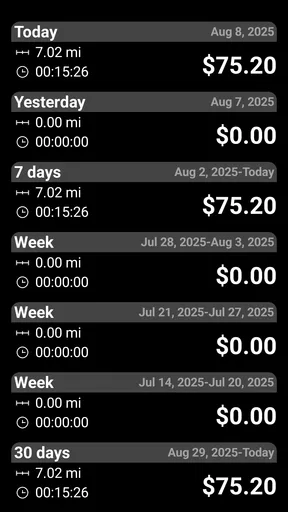
Before a busy shift, I would check that the correct tariff is active, the phone has enough charge, and a short test trip records the details as expected. For a long day, a car charger or another reliable charging plan is sensible for any GPS-dependent phone workflow. At the end of a shift, review the log while parked and keep receipts organized in the way your work requires. These small habits make the app more dependable without asking it to do the work of a dispatcher, accountant or compliance check.
Final Thoughts
So, is Taximeter the app you need on your phone? If you're in the taxi business, I’d say absolutely. It's reliable, easy to use, and packed with features that make your life easier. From accurate fare calculations to customizable tariffs, it covers all bases.
Whether you're a seasoned driver or just starting out, this app is designed to make your rides smoother and more efficient. It's like having a digital co-pilot that takes care of the nitty-gritty details while you focus on the road. Give it a whirl, and see how it transforms your driving experience. Safe travels!
Who I would recommend it to
My recommendation is strongest for a driver who wants a straightforward phone-based way to handle fares, extras, tax and trip records, and who is comfortable checking the setup before work. For that person, the practical benefit is not a promise that every trip will be effortless; it is having a consistent place to calculate and review the ride instead of piecing the details together afterward.
I would be more cautious if you need larger controls, audio-first interaction, or a legally approved meter for a specific jurisdiction. The most inclusive choice is the one that fits the driver’s abilities, vehicle layout and work rules, not simply the one with the most functions. Try the basic workflow while parked, confirm the fare logic against your local requirements, and keep a different option in mind if the screen or controls create friction. Used within those limits, this app is a sensible tool for independent fare tracking rather than an all-purpose taxi operation system.
Pros
- Accurate real-time fare calculation.
- User-friendly and intuitive interface.
- Supports multiple currencies.
- Customizable rate settings.
- Works offline without internet.
Cons
- May drain battery quickly.
- Limited customer support options.
- Ads can be intrusive at times.
- Occasional GPS signal issues.
- Not available in all languages.
FAQs for Taximeter. GPS taxi cab meter.
What features does the Taximeter app offer?
The Taximeter app provides several essential features for taxi drivers, including real-time GPS tracking, fare calculation based on distance and time, and the ability to store trip histories. Additionally, it offers customization options for different fare structures and integrates easily with various payment methods to streamline transactions.
How accurate is the GPS tracking in the Taximeter app?
The Taximeter app uses advanced GPS technology to ensure highly accurate location tracking. It continuously updates your position, providing precise data for fare calculations. However, the accuracy may be affected by factors such as poor signal strength in certain areas, so it is advisable to ensure a stable internet connection for optimal performance.
Is the Taximeter app user-friendly for new drivers?
Yes, the Taximeter app is designed with user-friendliness in mind, making it easy for new drivers to navigate. The interface is intuitive, with clear instructions and prompts to guide users through setup and daily operations. Additionally, there are tutorials and a help section for further assistance, ensuring a smooth learning curve.
Can I customize the fare settings in the Taximeter app?
Absolutely. The Taximeter app allows complete customization of fare settings, enabling drivers to set rates based on distance, time, or specific regional requirements. This flexibility ensures that the app can be tailored to meet local regulations or individual preferences, providing both legality and convenience.
What are the system requirements for installing the Taximeter app?
The Taximeter app requires a smartphone with at least Android 5.0 or iOS 11.0 and a stable internet connection, either through mobile data or Wi-Fi. It is also recommended to have a device with GPS capabilities for optimal tracking performance. Ensure your device has sufficient storage space to accommodate app updates and data storage.


